Pip Club
PipClub Momentum Edge EA – Price Action Forex EA for MT4 & MT5 Lifetime access
PipClub Momentum Edge EA – Price Action Forex EA for MT4 & MT5 Lifetime access
PipClub Momentum Edge EA – Price Action Forex EA for MT4 & MT5
Automate a real market-structure, breakout and retest trading strategy on MT4 & MT5.
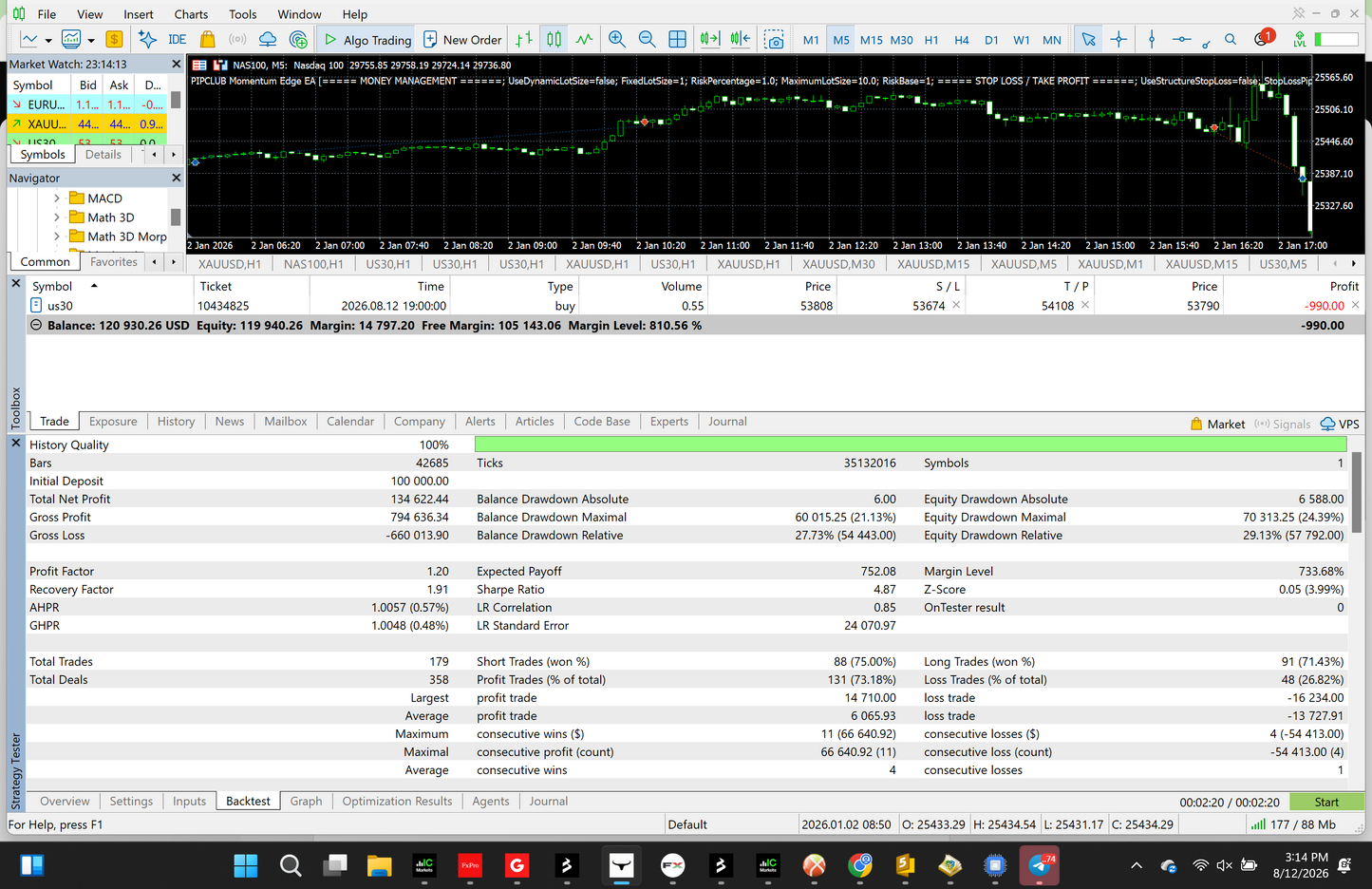
PipClub Momentum Edge EA is a fully automated price action Forex EA designed to identify market structure, confirmed breakouts, retests and continuation setups without relying on a complicated stack of trading indicators.
Built for MetaTrader 4 and MetaTrader 5, Momentum Edge EA can be tested across US30, NAS100, XAUUSD / Gold, EURUSD, GBPUSD, USDJPY, GBPJPY and other Forex markets.
Instead of automatically buying because an indicator becomes oversold or selling because two moving averages cross, Momentum Edge analyzes the actual movement of price.
Market Structure → Breakout → Retest → Continuation
Lifetime Access – $999
Get PipClub Momentum Edge EA for a one-time payment of $999 and receive Lifetime Access to the MT4 & MT5 versions.
$999 One-Time Payment • Lifetime Access • MT4 & MT5
The EA waits for the setup, confirms it using completed candles, and then automatically manages the trade according to your selected risk settings.
What Is PipClub Momentum Edge EA?
Momentum Edge EA is an automated Forex Expert Advisor for MT4 and MT5 built around price-action and market-structure trading.
The strategy identifies confirmed swing highs and swing lows to determine whether price is developing bullish or bearish structure.
For bullish setups, the EA looks for higher-high and higher-low market structure before monitoring an important swing high for a potential breakout.
For bearish setups, it looks for lower-high and lower-low structure before monitoring an important swing low.
A breakout alone is not enough.
Momentum Edge waits for price to return to the broken area and confirm that the level is holding before considering an entry.
This creates a structured trading sequence rather than chasing every market breakout.
How the Momentum Edge Strategy Works
1. Market Structure
Momentum Edge begins by identifying confirmed swing highs and swing lows.
The EA uses those swings to determine whether the market is developing bullish or bearish price structure.
A bullish environment is based on developing higher highs and higher lows.
A bearish environment is based on developing lower highs and lower lows.
This gives every potential trade a price-action context before an entry is considered.
2. Breakout Confirmation
When bullish structure is present, Momentum Edge monitors the relevant swing high for a potential resistance breakout.
When bearish structure is present, it monitors the relevant swing low for a potential support breakout.
The EA does not react simply because price briefly moves through a level.
Its primary strategy decisions use completed candles to confirm the breakout.
3. Breakout Retest
Momentum Edge does not automatically chase the market immediately after a breakout.
After a confirmed breakout, the EA waits for price to return toward the broken market-structure level.
Former resistance can then be evaluated as potential support during a BUY setup.
Former support can be evaluated as potential resistance during a SELL setup.
4. Continuation Confirmation
The retest must hold according to the strategy rules.
For BUY setups, the EA looks for bullish price confirmation after the retest.
For SELL setups, it looks for bearish confirmation.
Only after the complete sequence is satisfied can the EA execute a trade.
Structure → Breakout → Retest → Confirmation → Entry
Fully Automated MT4 & MT5 Trading
Momentum Edge EA is available for both MetaTrader 4 and MetaTrader 5.
Once installed and configured, the Expert Advisor can automatically:
-
Analyze market structure
-
Identify BUY and SELL opportunities
-
Detect confirmed breakouts
-
Wait for breakout retests
-
Execute qualifying trades
-
Apply Stop Loss
-
Apply Take Profit
-
Manage optional trailing stops
-
Calculate fixed or risk-based position sizes
-
Enforce maximum trade limits
You remain in control of the major money-management settings.
Markets You Can Test
Momentum Edge EA was designed with reusable price-action logic rather than rules hardcoded for one specific instrument.
You can test it on:
US30 / Dow Jones
Trade market-structure and breakout/retest setups on US30.
NAS100 / Nasdaq
Apply the same price-action methodology to NAS100.
XAUUSD / Gold
Test automated breakout and retest setups on Gold.
Forex
Momentum Edge can also be tested on major Forex pairs including:
EURUSD
GBPUSD
USDJPY
GBPJPY
and other broker-supported currency pairs.
Performance can vary significantly between markets, brokers, settings and market conditions. Backtest and demo-test any configuration before considering live use.
Adjustable Stop Loss & Take Profit
Every Momentum Edge trade can use a real broker-side Stop Loss and Take Profit.
You can adjust:
Stop Loss in Pips
Choose the initial maximum stop distance used by the EA when fixed-stop mode is selected.
Take Profit in Pips
Set the profit target according to the market and strategy configuration you are testing.
Optional Structure-Based Stop Loss
Momentum Edge also includes an optional structure-based Stop Loss mode.
When enabled, the EA can place the Stop Loss relative to the price structure associated with the retest rather than using only a fixed pip distance.
This allows you to test both:
Fixed Pip Stop Loss
and
Price-Structure Stop Loss
without changing the core entry strategy.
Adjustable Trailing Stop
Momentum Edge includes optional automatic trailing-stop management.
Adjust:
Use Trailing Stop: True / False
Trailing Start in Pips
Choose how far the position must move into profit before trailing begins.
Trailing Stop Distance in Pips
Choose approximately how far behind market price the Stop Loss should trail.
Once the trailing stop advances, the EA is designed not to deliberately move it backward and increase the existing stop distance.
Fixed Lot or Dynamic Risk Management
Choose how Momentum Edge calculates trade size.
Fixed Lot Size
Turn Dynamic Lot Size off and select the exact lot size you want the EA to use.
Dynamic Lot Size
Turn Dynamic Lot Size on and select your Risk Percentage.
The EA then calculates position size using the account value and actual Stop Loss distance while respecting available broker volume specifications.
You can also set a:
Maximum Lot Size
to cap the maximum position size allowed by the EA.
Control Multiple Positions
Momentum Edge gives you control over how many trades the EA can hold.
Adjust:
Maximum Open Trades
Limit the total number of Momentum Edge positions on the current symbol.
Maximum Open BUY Positions
Set the maximum number of BUY positions.
Maximum Open SELL Positions
Set the maximum number of SELL positions.
Block Opposite Trades
When enabled, the EA prevents new SELL positions while its BUY positions are open and prevents new BUY positions while its SELL positions are open.
A future same-direction trade still requires a new qualifying strategy setup.
No Martingale. No Grid. No Averaging Down.
Momentum Edge EA was not designed around aggressive recovery money management.
The strategy does not intentionally use:
-
Martingale lot multiplication
-
Grid trading
-
Unlimited positions
-
Recovery baskets
-
Automatic averaging into losing positions
Every trade uses defined risk-management parameters.
Adjustable Trading Timeframe
The trading timeframe is adjustable.
This allows you to research Momentum Edge on different timeframes without rewriting the EA.
Because different instruments behave differently, there is no universal promise that one timeframe or setting will produce the same result across every broker and market.
Use MetaTrader's Strategy Tester and demo trading to evaluate the settings appropriate for the instrument you intend to trade.
Why Momentum Edge EA Is Different
Many automated Forex robots are built around combinations of traditional indicators.
Momentum Edge takes a different approach.
Its primary trading logic focuses on:
Price structure
Swing highs and lows
Breakouts
Retests
Continuation confirmation
The objective is to automate a recognizable price-action methodology rather than build trade entries around an oversized combination of oscillators and indicator signals.
Who Is Momentum Edge EA For?
Momentum Edge may be suitable for traders who want to:
-
Automate a price-action trading strategy
-
Use an MT4 or MT5 Forex EA
-
Test automated US30 trading
-
Test automated NAS100 trading
-
Test an XAUUSD / Gold EA
-
Automate trading on major Forex pairs
-
Control their own Stop Loss and Take Profit
-
Use either fixed or dynamic position sizing
-
Research breakout and retest trading without manually monitoring every chart
You should still understand the risks associated with leveraged trading and automated execution.
Important Risk Information
Trading Forex, CFDs, indices and metals involves risk.
No Expert Advisor can guarantee profits or eliminate trading losses.
Historical backtests, demonstrations and previous market behavior do not guarantee future results.
Results may differ because of broker pricing, spreads, commissions, execution, slippage, symbol specifications, trading settings and changing market conditions.
Always test the EA carefully on historical data and a demo account before deciding whether it is appropriate for your trading objectives and risk tolerance.
Momentum Edge EA FAQ
What is a Forex EA?
A Forex EA, or Expert Advisor, is software designed to run inside MetaTrader and automate predefined trading rules. Momentum Edge EA automatically analyzes its price-action conditions and can execute qualifying trades according to its programmed strategy and risk settings.
Does Momentum Edge EA work on MT5?
Yes. PipClub Momentum Edge EA includes an MT5 version designed for MetaTrader 5.
Does Momentum Edge EA work on MT4?
Yes. An MT4 version is also available for MetaTrader 4.
Can Momentum Edge EA trade US30?
The strategy can be tested on broker-supported US30 instruments. Because symbol names and trading specifications differ between brokers, results can vary.
Can it trade NAS100?
Yes. Momentum Edge's market-structure and breakout/retest methodology can be tested on NAS100 where offered by your MetaTrader broker.
Can Momentum Edge trade XAUUSD / Gold?
Yes. The EA can be tested on XAUUSD / Gold in addition to indices and Forex pairs.
Can the EA trade EURUSD and other Forex pairs?
Yes. The same core price-action strategy can be tested on EURUSD, GBPUSD, USDJPY, GBPJPY and other supported Forex pairs.
How does the breakout and retest strategy work?
Momentum Edge first identifies market structure through confirmed swing highs and lows. It then waits for price to break a relevant structure level using a completed candle. Instead of immediately chasing the breakout, the EA waits for a retest and continuation confirmation before an entry can occur.
Does Momentum Edge use martingale?
No. Momentum Edge is not intentionally designed as a martingale system and does not multiply lot sizes after losses as part of its strategy.
Is Momentum Edge a grid trading EA?
No. The EA is not designed to build a grid of positions at predetermined price intervals.
Can I change the Stop Loss and Take Profit?
Yes. Stop Loss and Take Profit distances are adjustable.
The EA also includes an optional structure-based Stop Loss mode.
Can I use fixed or dynamic lot sizing?
Yes.
You can use a Fixed Lot Size or enable Dynamic Lot Size and select a Risk Percentage and Maximum Lot Size.
Is Momentum Edge EA guaranteed to make money?
No.
Automated trading always involves risk. Market behavior changes, and performance can vary considerably depending on instrument, timeframe, broker conditions, settings and execution.
Automate Price Action With Momentum Edge EA
Trade less manually and put your market-structure rules into an automated system.
PipClub Momentum Edge EA gives you an MT4 & MT5 price action Forex EA built around market structure, confirmed breakouts, retests and continuation—while giving you control over Stop Loss, Take Profit, trailing stops and position sizing.
Get PipClub Momentum Edge EA – $999 One-Time Payment for Lifetime Access.
Start testing the price-action strategy on your preferred MT4 or MT5 markets today.
No se pudo cargar la disponibilidad de recogida